By Enterprise Data & Analytics
The SSIS Catalog Was Never Finished.
You followed best practices. Small packages. Single responsibility. Now you have dozens of SSIS packages and no way to orchestrate them. The SSIS Framework fixes that.
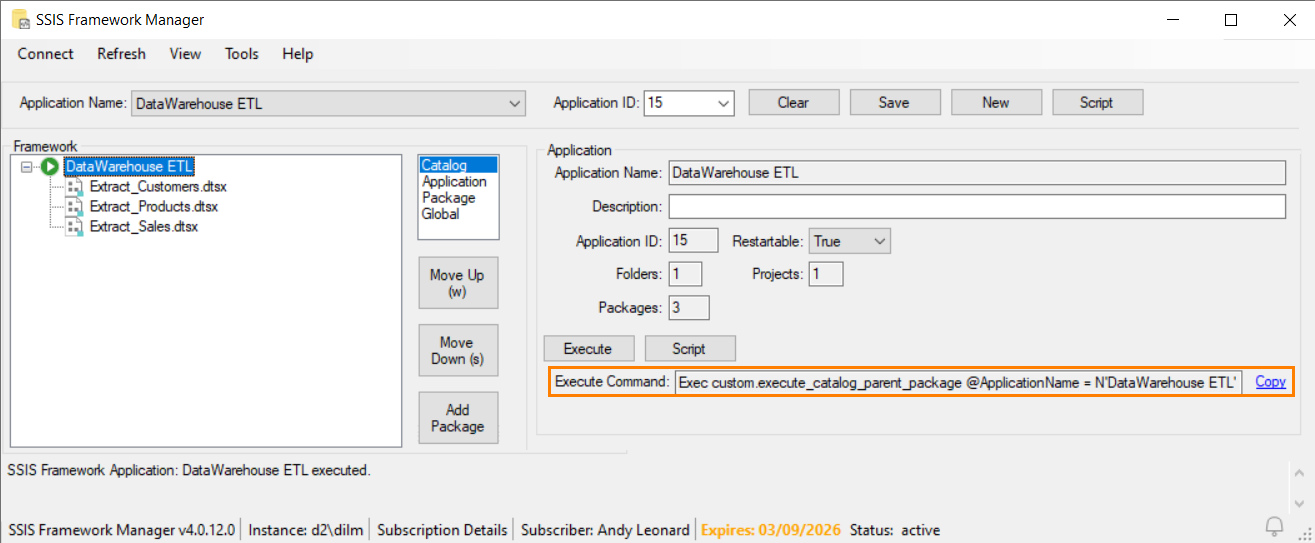
Copy the generated command directly into SQL Agent, cron, or any scheduler.
20+
Years SSIS Expertise
12+
Books Published
8x MVP
Microsoft Data Platform
100+
Conference Presentations
1M+
Packages Orchestrated
The Problem
You Built It Right. Now You Can't Run It.
You followed the SSIS best practice: small, single-purpose packages. Each one does its job well. But now you have dozens—maybe hundreds—of packages that need to execute in a specific order.
The SSIS Catalog handles deployment and configuration. But it has no answer for orchestration.
"You now have a bunch of SSIS packages that require executing in some order. What's a data engineer to do?"
The Execute Package Task can only call packages within the same project. Cross-project execution? Not supported. You're trapped in a single SSIS project, or you're building brittle workarounds with SQL Agent jobs and batch scripts.
No Orchestration
The Catalog deploys packages. It doesn't run them in order.
Project Boundaries
Execute Package Task is locked to a single project. Cross-project calls blocked.
Full Re-Runs on Failure
ETL fails at package 47 of 71? Restart from 1. Hours wasted.
The Solution
One Stored Procedure. Every Package. In Order.
SSIS Framework is a metadata-driven orchestration engine that sits on top of the SSIS Catalog. Define your application once. Execute it with a single command.
-- Package 1 of 71...
EXEC [SSISDB].[catalog].[create_execution]
@package_name = 'Extract_Customers.dtsx',
@folder_name = 'ETL',
@project_name = 'DataWarehouse',
@execution_id = @exec_id OUTPUT
EXEC [SSISDB].[catalog].[start_execution] @exec_id
-- Wait... check status... handle errors...
-- Now repeat for packages 2 through 71
-- 500+ lines of brittle T-SQL
Why SSIS Framework
Built for How You Actually Work
Stop Managing Packages One at a Time
Define an SSIS Application—a collection of packages configured to execute in a specific order. Add new packages by adding metadata rows, not code. Remove them the same way.
Metadata-driven orchestration →
Break Free from Project Boundaries
The Execute Package Task locks you into a single SSIS project. SSIS Framework orchestrates packages across any project, any folder in the Catalog. Share utility packages across applications without duplication.
Cross-project execution →
All orchestrated as a single application
Restart from Failure, Not from Zero
Your ETL fails at package 47 of 71 at 3 AM. Without a framework, you re-run all 71. With SSIS Framework, you restart from package 47. Hours saved. Every time.
Application restartability →
Pkg 1-46: ✔ Complete (skipped on restart)
Pkg 47: ✘ Failed ← Restart here
Pkg 48-71: ⏸ Pending
Know Exactly What Ran, When, and Why
Every package execution gets a discrete ID in the SSIS Catalog. Your DBA can see exactly which packages ran, in what order, with what parameters. Root cause analysis in minutes, not hours.
Centralized logging & governance →
The Ecosystem
SSIS Framework Is Just the Start
Part of the DILM Suite—a complete toolkit for Data Integration Lifecycle Management. Every tool works together.

SSIS Framework
Metadata-driven orchestration. Execute entire SSIS applications with a single command.
Featured Product
SSIS Catalog Compare
Compare and deploy SSIS Catalogs across environments. Script entire folders with dependency ordering.
Enterprise: $4,995/year
SSIS Framework Manager
Visual management tool for SSIS Framework. Create, configure, and execute applications from a GUI.
Included with commercial editions
SSIS Catalog Browser
Single treeview of your entire SSIS Catalog. See every artifact, property, and configuration at a glance.
FreeSSIS Training
From Zero to SSIS, Expert SSIS, and Master the SSIS Catalog. Live and recorded courses from Andy Leonard.

DELM Suite
From Data Engineering Management Suite. Moving to Microsoft Fabric? DELM Suite includes Fabric Navigator, Pipeline Navigator, and AI Playbook.
Data Engineering Lifecycle ManagementPricing
Choose Your Edition
Every edition includes the core SSIS Framework orchestration engine.
Framework Core - Coming Soon
Engine edition for technically mature teams
- ✔ Metadata-driven orchestration
- ✔ Cross-project execution
- ✔ Application restartability
- ✔ Centralized logging
- ✔ Email support
SSIS Framework
Streamline SSIS DevOps with Framework Manager
- ✔ Everything in Framework Core
- ✔ SSIS Framework Manager
- ✔ T-SQL script generation
Next-Gen SSIS Catalog Compare – Coming Soon
Enterprise-Grade Lifecycle & DevOps for SSIS
- ✔ SSIS Catalog Compare v2

About the Builder
Andy Leonard
Andy Leonard is an 8-time Microsoft Data Platform MVP, BimlHero, and the Chief Data Engineer at Enterprise Data & Analytics. He writes the Engineer of Data newsletter, has authored or co-authored 12+ books on data integration, presented at 100+ international conferences, and has been building SSIS solutions for over two decades.
"I Am Here To Help."
Andy literally wrote the book on SSIS frameworks. His "Data Integration Life Cycle Management with SSIS" (Apress) is the definitive guide to managing SSIS in the enterprise. The SSIS Framework is the culmination of decades of real-world consulting distilled into tooling you can deploy today.
What People Say
Trusted by Data Engineers
"One deployment package took 40 minutes to deploy – given the task to deploy over 400+ SSIS packages – that took a very long time. When I found the Catalog Compare tool, it took the deployment of 400 packages to 3-5 minutes per package (or less) with repeatable results in each environment. It's a super time-saver with a 'keep it simple' front end."
ETL Architect
"I tried to reconcile two SSIS Catalogs for a week. I used SSIS Catalog Compare and was finished in less than one hour."
Enterprise Architect
"Hey, I demoed Catalog Compare to a team member last Thursday and it ended up saving them hours of work. I looked like a hero and so did you."
Enterprise Data Engineer
FAQ
Common Questions
SSIS Framework supports SQL Server 2016 and later, including SQL Server 2017, 2019, 2022, and 2025. It also works with Azure Data Factory's SSIS Integration Runtime for cloud deployments.
The SSIS Framework can be deployed and configured in a single day for most environments. For complex enterprise deployments with hundreds of packages, EDNA offers consulting to accelerate the process.
Yes. SSIS Framework integrates directly with your existing SSIS Catalog. It adds orchestration on top of what the Catalog already provides—deployment, environments, and configuration all continue to work as expected.
SSIS Framework is not a competing investment—it's a bridge. Many enterprises will run SSIS for years during migration. The Framework keeps your existing SSIS estate healthy while you plan your Fabric transition.
All editions include the Framework Core orchestration engine. SSIS Framework adds the visual Framework Manager and script generation. See full comparison ↑
Yes. One year access to SSIS Premium - a $199 value - is included in each subscription to SSIS Framework or Framework Core. SSIS Premium is a collection of multiple recorded SSIS training courses, from "From Zero to SSIS" for beginners to "Expert SSIS" for enterprise-scale design patterns and DevOps. Also included, "Master the SSIS Catalog" View courses →
Ready to Complete Your SSIS Catalog?
Schedule a consultation. We'll review your SSIS estate and show you how the Framework fits. Or join the DILM Suite Community.
Book a Consultation
Meet with Andy Leonard and the EDNA team to review your SSIS environment. We'll assess your orchestration needs and walk you through SSIS Framework.